Guide to Deploying a Scalable Django + DRF App on AWS with Docker, ECS, and Fargate
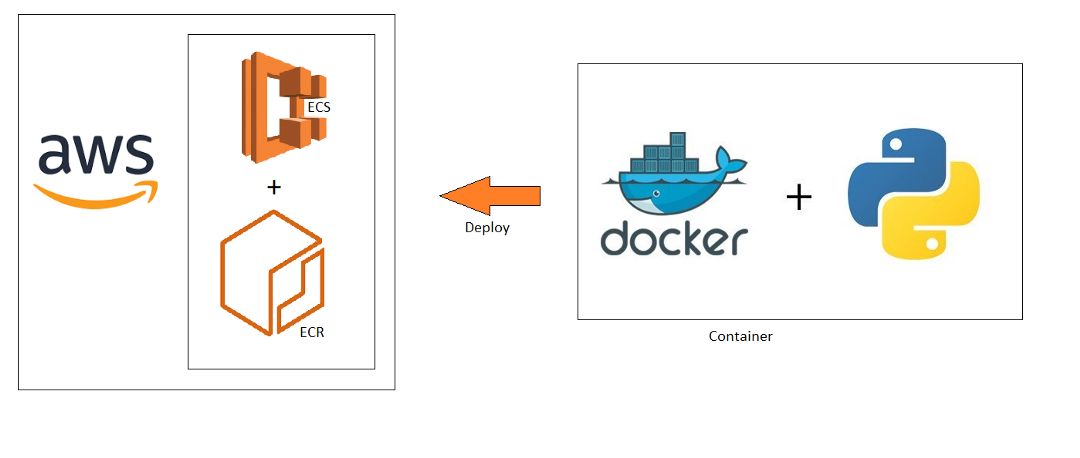
Deploying a Django + DRF app in production isn’t as straightforward as running python manage.py runserver. For local development, Django's built-in development server works well enough, but it's not designed to handle high traffic, scale across multiple servers, or integrate with complex cloud infrastructure.
To deploy a production-ready Django app that is scalable, secure, and highly available, we need a more robust infrastructure. This is where Docker, AWS ECS, Fargate, and Kubernetes come in.
In this guide, we will create a containerized Django application, push it to a container registry (AWS ECR), deploy it on AWS using ECS with Fargate, and set up automatic scaling, load balancing, and monitoring. We'll also secure the app with HTTPS using AWS ACM (Certificate Manager), and store static/media files in AWS S3. Finally, we’ll explore how Kubernetes fits into the picture and why you may want to use it over ECS for complex setups.
If you follow along, you'll learn how to:
Dockerize a Django app
Create an AWS ECR repository
Deploy the app on AWS ECS using Fargate
Configure load balancing using AWS ALB
Set up auto-scaling
Store static and media files on AWS S3
Manage secrets securely using AWS Secrets Manager
Set up monitoring using AWS CloudWatch
Secure the app with HTTPS using AWS ACM
Optionally deploy using Kubernetes
Prerequisites
Before we begin, ensure that you have the following:
Basic Requirements:
Basic understanding of Docker
Familiarity with Django and DRF
AWS account with admin access
AWS CLI installed
Docker installed
Tools and Versions:
| Tool | Version | Purpose |
| Python | 3.11+ | Programming language |
| Django | 4.2+ | Web framework |
| DRF | 3.14+ | REST API framework |
| Docker | Latest | Containerization |
| AWS CLI | Latest | AWS command-line interface |
| Gunicorn | Latest | Production WSGI server |
| Postgres | 14+ | Database |
| Kubernetes (Optional) | Latest | Container orchestration |
1. Set Up a Django + DRF Project
Let’s begin by creating a new Django project and setting up DRF.
Step 1.1: Create a New Django Project
Create a project directory and a virtual environment:
mkdir django-aws-deploy
cd django-aws-deploy
python -m venv env
source env/bin/activate
Step 1.2: Install Django and DRF
Install Django, DRF, and Gunicorn:
pip install django djangorestframework gunicorn psycopg2-binary
Create a new Django project:
django-admin startproject myproject .
Create a DRF app:
python manage.py startapp api
Step 1.3: Configure DRF
Add rest_framework to INSTALLED_APPS in settings.py:
myproject/settings.py
INSTALLED_APPS = [
    'django.contrib.admin',
    'django.contrib.auth',
    'django.contrib.contenttypes',
    'django.contrib.sessions',
    'django.contrib.messages',
    'django.contrib.staticfiles',
    'rest_framework',
    'api',
]
Step 1.4: Create a Sample DRF Endpoint
api/views.py
from rest_framework.decorators import api_view
from rest_framework.response import Response

@api_view(['GET'])
def hello_world(request):
    return Response({'message': 'Hello World!'})
api/urls.py
from django.urls import path
from .views import hello_world

urlpatterns = [
    path('hello/', hello_world),
]
myproject/urls.py
from django.contrib import admin
from django.urls import path, include

urlpatterns = [
    path('admin/', admin.site.urls),
    path('api/', include('api.urls')),
]
Test the endpoint:
python manage.py runserver
Navigate to:
http://127.0.0.1:8000/api/hello/
2. Dockerize the Django Project
To ensure our app runs consistently across different environments, we need to containerize it using Docker.
Step 2.1: Create a Dockerfile
Create a Dockerfile in the root of the project:
Dockerfile
# Use official Python image
FROM python:3.11-slim

# Environment settings
ENV PYTHONDONTWRITEBYTECODE 1
ENV PYTHONUNBUFFERED 1

# Set working directory
WORKDIR /app

# Install dependencies
COPY requirements.txt .
RUN pip install --no-cache-dir -r requirements.txt

# Copy project files
COPY . .

# Collect static files
RUN python manage.py collectstatic --noinput

# Expose port
EXPOSE 8000

# Start server with Gunicorn
CMD ["gunicorn", "myproject.wsgi", "--bind", "0.0.0.0:8000", "--workers", "4"]
🔹 Step 2.2: Create Docker Compose for Local Development
docker-compose.yml
version: '3.8'

services:
  web:
    build:
      context: .
      dockerfile: Dockerfile
    ports:
      - "8000:8000"
    env_file:
      - .env
    volumes:
      - .:/app
    depends_on:
      - db

  db:
    image: postgres:14
    environment:
      POSTGRES_DB: mydb
      POSTGRES_USER: myuser
      POSTGRES_PASSWORD: mypassword
    ports:
      - "5432:5432"
    volumes:
      - postgres_data:/var/lib/postgresql/data

volumes:
  postgres_data:
Step 2.3: Create a .dockerignore File
Exclude unnecessary files from Docker builds:
.dockerignore
__pycache__
*.pyc
*.log
venv
node_modules
.env
Step 2.4: Build and Run Docker Containers
Build the Docker container:
docker-compose build
Run the container:
docker-compose up
Stop the container:
docker-compose down
Check running containers:
docker ps
Step 2.5: Debug Docker
Get logs:
docker logs <container-name>
Open a shell into the running container:
docker exec -it <container-name> bash
Step 2.6: Tag and Push Docker Image
- Authenticate Docker with AWS:
aws ecr get-login-password --region us-east-1 | docker login --username AWS --password-stdin <account-id>.dkr.ecr.us-east-1.amazonaws.com
- Tag the Docker image:
docker tag myproject:latest <account-id>.dkr.ecr.us-east-1.amazonaws.com/myproject:latest
- Push to AWS ECR:
docker push <account-id>.dkr.ecr.us-east-1.amazonaws.com/myproject:latest
Why AWS ECS + Fargate?
Elastic Container Service (ECS) is Amazon’s native container orchestration service. It's similar to Kubernetes but tightly integrated with AWS infrastructure, making it easier to manage and scale.
Fargate allows you to run ECS containers without managing EC2 instances or infrastructure.
No need to provision EC2 instances
Fully managed by AWS
Scales automatically based on demand
Secure by default using IAM and VPC
Create an ECS cluster using Fargate.
Create a task definition to define the container settings.
Create an ECS service to run the container.
Set up an Application Load Balancer (ALB) for traffic routing.
Set up auto-scaling based on traffic.
Configure AWS Secrets Manager for securely handling sensitive information.
Set up logging and monitoring using CloudWatch.
Create an ECS Cluster
An ECS Cluster is the foundational unit for deploying Docker containers on AWS.
Fargate will handle the underlying infrastructure.
We'll create a cluster that allows containers to scale based on load.
Create an ECS Cluster
Open the AWS Management Console.
Go to Elastic Container Service (ECS) → Clusters → Create Cluster.
Select "Networking Only" (Fargate).
Name the cluster →
django-cluster.Create the cluster.
Verify Cluster
Check that the cluster is created:
aws ecs list-clusters
Create an ECS Task Definition
A task definition is a blueprint that defines how a container should run in ECS:
Which Docker image to use
Memory and CPU limits
Logging configuration
Network mode
Create a New Task Definition
Go to ECS → Task Definitions → Create Task Definition.
Choose Fargate.
Set the following:
Task Name:
django-taskTask Role: Create a new role (
ecsTaskExecutionRole)Network Mode:
awsvpcCPU: 512
Memory: 1024
Define Container Settings
Add a container to the task definition:
Container Name:
django-appImage:
account-id.dkr.ecr.us-east-1.amazonaws.com/myproject:latestPort Mappings:
8000
Define Logging Settings
Enable logging to CloudWatch:
Log Driver:
awslogsLog Group:
/ecs/django-appRegion:
us-east-1Stream Prefix:
ecs
Environment Variables
Pass environment variables to the container:
| Key | Value |
DEBUG | False |
ALLOWED_HOSTS | * |
DATABASE_URL | Retrieved from Secrets Manager |
SECRET_KEY | Retrieved from Secrets Manager |
Add Health Check
Add a health check:
Protocol: HTTP
Path:
/health/Interval: 30 seconds
Timeout: 5 seconds
Healthy Threshold: 2
Unhealthy Threshold: 2
Save Task Definition
Save the task definition.
Create an ECS Service
An ECS Service allows you to run and maintain a specified number of instances of a task definition.
Create Service
Go to ECS → Create Service
Select "Fargate" as the launch type.
Cluster:
django-clusterService Type:
ReplicaNumber of tasks:
2(for high availability)
Define Networking Settings
Choose an existing VPC.
Select at least two subnets in different Availability Zones.
Create a new Security Group:
Allow inbound traffic on port 80 (HTTP)
Allow inbound traffic on port 443 (HTTPS)
Allow inbound traffic on port 8000 (from Load Balancer)
Enable Auto Scaling
Enable auto-scaling.
Set up a policy based on CPU utilization:
Scale up at 70% CPU
Scale down at 30% CPU
Minimum tasks = 2
Maximum tasks = 10
Save Service
Save the ECS service.
Set Up an Application Load Balancer (ALB)
An ALB will distribute incoming traffic to the ECS tasks.
Create an ALB
Go to EC2 → Load Balancers → Create Load Balancer
Choose Application Load Balancer
Scheme: Internet-facing
Security Group: Use the ECS security group
Create a Target Group
Go to Target Groups
Create a target group for HTTP traffic:
Protocol: HTTP
Port: 8000
Register your ECS tasks in the target group.
Attach Target Group to ALB
Go to Listeners → Add listener
Protocol: HTTP
Forward traffic to the target group
Test the Deployment
Find the ALB's DNS name:
aws elbv2 describe-load-balancers --query "LoadBalancers[].DNSName"
Test the endpoint:
curl http://<ALB-DNS-Name>/api/hello/
If everything is set up correctly, you'll see:
{"message": "Hello World!"}
Secure with HTTPS (AWS ACM)
AWS ACM (Certificate Manager) provides free SSL certificates.
Request Certificate
Go to ACM → Request Certificate
Use DNS validation
Attach to ALB
Add HTTPS Listener
Go to ALB → Listeners
Add listener for HTTPS (443)
Forward traffic to the ECS target group
Force HTTPS in Django
SECURE_SSL_REDIRECT = True
SESSION_COOKIE_SECURE = True
CSRF_COOKIE_SECURE = True
Update the Health Check Endpoint
Add a health check for ECS:
api/views.py
@api_view(['GET'])
def health(request):
    return Response({"status": "healthy"})
api/urls.py
urlpatterns = [
    path('health/', health),
]
Restart ECS Service
After making these changes, restart the ECS service:
aws ecs update-service --cluster django-cluster --service django-service --force-new-deployment
Overview of AWS Architecture
The architecture we'll build will look like this:
                          +---------------+
                           |   Route 53    |
                           +---------------+
                                   |
                           +---------------+
                           |   AWS ACM      |   <-- SSL Certificate
                           +---------------+
                                   |
                   +--------------------------------+
                   |    AWS Application Load Balancer |
                   +--------------------------------+
                            |             |
+---------------------+  +---------------------+  +---------------------+
|      ECS Task       |  |      ECS Task       |  |      ECS Task       |
|    (Gunicorn)       |  |    (Gunicorn)       |  |    (Gunicorn)       |
+---------------------+  +---------------------+  +---------------------+
            |                       |                        |
+----------------------+  +----------------------+  +----------------------+
|    AWS Fargate        |  |    AWS Fargate        |  |    AWS Fargate        |
+----------------------+  +----------------------+  +----------------------+
            |                       |                        |
+----------------------+  +----------------------+  +----------------------+
|      AWS VPC          |  |      AWS VPC          |  |      AWS VPC          |
+----------------------+  +----------------------+  +----------------------+
            |                       |                        |
+-----------------------+
|     AWS RDS (Postgres) |
+-----------------------+
            |
+-----------------------+
|     AWS S3 (Static)    |
+-----------------------+
            |
+-----------------------+
| AWS Secrets Manager    |
+-----------------------+
Set Up AWS ECS and Fargate
Amazon ECS (Elastic Container Service) allows you to run Docker containers at scale. Fargate lets you run ECS containers without provisioning or managing EC2 instances — AWS manages the infrastructure for you.
Create an ECS Cluster
Go to ECS → Clusters → Create Cluster
Choose "Networking Only (Fargate)"
Name the cluster →
django-clusterCreate the cluster
Create a Task Definition
A task definition is a blueprint for running containers in ECS.
Go to ECS → Task Definitions → Create New
Launch Type → Fargate
Network Mode → awsvpc
Task Size
CPU: 512 (0.5 vCPU)
Memory: 1024 MB (1 GB)
Define Container Settings
| Parameter | Value |
| Container Name | django-app |
| Image | account-id.dkr.ecr.us-east-1.amazonaws.com/myproject:latest |
| Port | 8000 |
| Essential | Yes |
Set Logging Configuration
Configure logs to be sent to CloudWatch:
Log Driver →
awslogsLog Group →
/ecs/django-appRegion →
us-east-1Stream Prefix →
ecs
Environment Variables
| Key | Value |
DEBUG | False |
ALLOWED_HOSTS | * |
DATABASE_URL | Retrieved from Secrets Manager |
SECRET_KEY | Retrieved from Secrets Manager |
Create ECS Service
Go to ECS → Create Service
Choose:
Launch Type: Fargate
Cluster:
django-clusterService Type:
ReplicaNumber of tasks: 2 (for high availability)
Networking:
VPC → Select existing VPC
Subnets → Select at least two subnets in different Availability Zones
Security Group → Create new Security Group
Health Check Grace Period: 60 seconds
Enable Auto-Scaling:
Minimum tasks = 2
Maximum tasks = 10
Scale at 70% CPU
Scale down at 30% CPU
Create Security Group
Create a new security group for ECS:
Inbound Rules:
Allow HTTP (80) from
0.0.0.0/0Allow HTTPS (443) from
0.0.0.0/0Allow port 8000 from Load Balancer
Outbound Rules:
- Allow All traffic
Create an Application Load Balancer (ALB)
Go to EC2 → Load Balancers
Create a new Application Load Balancer
Type: Internet-facing
Security Group: Use the ECS security group
Target Group: Create a target group for port 8000
Health Check Settings
Protocol → HTTP
Path →
/health/Interval → 30 seconds
Timeout → 5 seconds
Unhealthy threshold → 2
Healthy threshold → 2
Attach Load Balancer to ECS
Go to ECS → Services
Edit the service → Add load balancer
Attach to target group
Update the Django Health Endpoint
api/views.py
@api_view(['GET'])
def health(request):
    return Response({'status': 'healthy'})
api/urls.py
urlpatterns = [
    path('health/', health),
]
Update Allowed Hosts in Django
ALLOWED_HOSTS = ['my-load-balancer-url.us-east-1.elb.amazonaws.com']
Apply Changes
- Update ECS Service:
aws ecs update-service --cluster django-cluster --service django-service --force-new-deployment
- Watch deployment logs:
aws logs tail /ecs/django-app --follow
Scaling Strategy
AWS ECS Auto Scaling allows scaling based on CloudWatch metrics.
Example Scaling Policy
CPU > 70% → Add 1 task
CPU < 30% → Remove 1 task
Minimum = 2 tasks
Maximum = 10 tasks
Kubernetes (Optional)
ECS works well for most production needs, but for multi-container, complex workloads, Kubernetes is a better option.
Set Up Kubernetes on AWS (EKS)
- Install EKS CLI:
brew install eksctl
- Create Cluster:
ksctl create cluster --name django-cluster --region us-east-1 --nodes 3
- Deploy to Kubernetes:
kubectl apply -f deployment.yaml
- Expose service:
kubectl expose deployment django-deploy --type=LoadBalancer --port=80 --target-port=8000
You've now deployed a production-grade Django + DRF application using Docker, AWS ECS, and Fargate. Your app is running on a highly available, auto-scaling infrastructure with secure HTTPS, automated scaling, and centralized logging.
What We Have Achieved:
✔️ Dockerized our Django + DRF app
✔️ Pushed the Docker image to AWS ECR
✔️ Deployed using ECS with Fargate
✔️ Configured load balancing with ALB
✔️ Secured with AWS ACM and HTTPS
✔️ Automated scaling and monitoring with CloudWatch
Reach out for discussing your infrastructure and deployment strategies: AhmadWKhan.com
Happy Deployment! :)
Comments
Join the discussionNo comments yet. Be the first to comment.